
Test
The Narrative Player
Appearance, behaviour, knowledge — the avatar is built. Before you hand it to a coding agent, you want to watch it behave: does a question actually route through the state machine the way you wired it, does the right expression show up, does a frustrated visitor get empathy instead of a canned answer? The Narrator is the first of two built-in test surfaces for exactly that. It plays scripted visitor journeys through the avatar's real runtime — the same intent classifier, guards, transitions, and response LLM a live turn uses — and lights up the state-machine graph as each state goes active, so you watch the machine run rather than imagine it.
It has a second job, too. The Happy Path you play here is recorded, and once you publish the avatar to the gallery that recording is frozen as the avatar's canonical narrative — the ground truth a coding agent later diffs its integration against with verify_deployment. Testing and the deployment contract are the same artifact.
Getting in
The two test surfaces — Narrator and Simulator — sit as toggles in the top-left corner of the studio. They're mutually exclusive: opening one closes the other, because both claim the left rail and only one conversation can drive the canvas at a time.
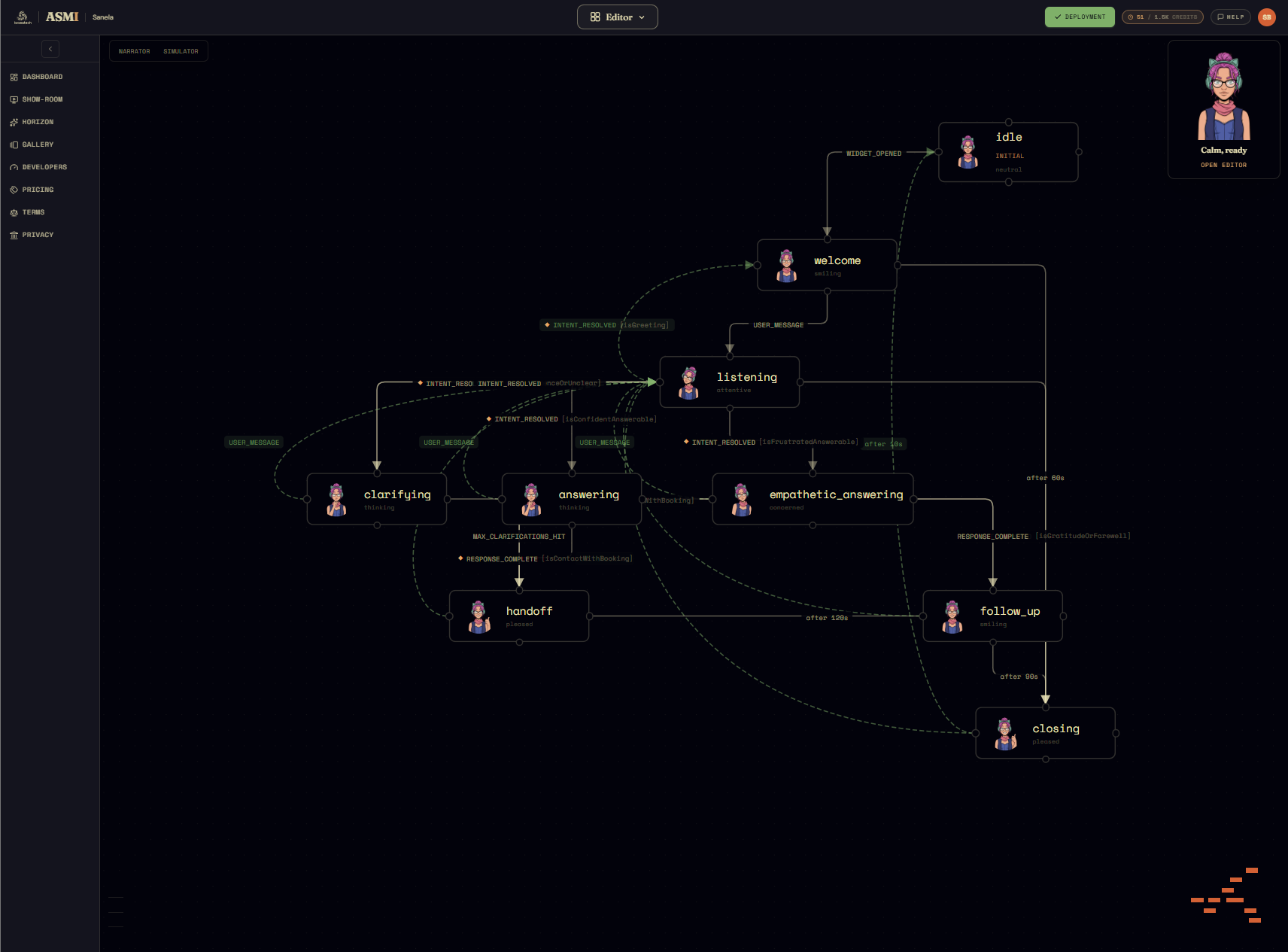
Click Narrator and it opens as a column down the left side, in front of the state-machine graph.
The panel
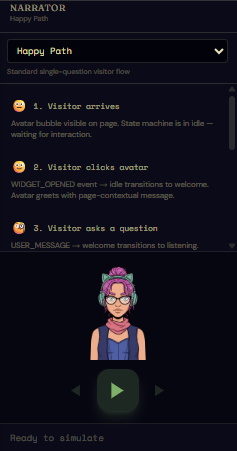
Top to bottom, the Narrator is:
- A scenario dropdown — which journey to play. It opens on Happy Path, the standard single-question flow, with a one-line description beneath it.
- The step list — every step of the chosen scenario, each carrying the expression the avatar should be wearing and a one-line note on the event and transition it represents (e.g. "USER_MESSAGE → welcome transitions to listening. Intent classifier runs."). It doubles as a table of contents: click any step to jump the canvas highlight straight to that state.
- The avatar preview — the actual generated face for the current step's expression (neutral, attentive, thinking, concerned…), so you watch the face change, not just a label.
- The transport — step-back, a large play/pause, step-forward, a speed selector (0.5× / 1× / 2×), and a row of progress dots. Until you press play it reads Ready to simulate.
Playing a narrative
Pick a scenario and press play. The Narrator walks the script one step at a time, and for each step it does the real thing: steps that carry a visitor message (the first is the widget opening, the rest are typed questions) are run through the avatar's live state machine and response LLM, exactly as a deployed turn would be. The pure-transition steps in between — intent resolved, response complete, idle timeout — are the machine's own internal moves, narrated rather than re-computed.
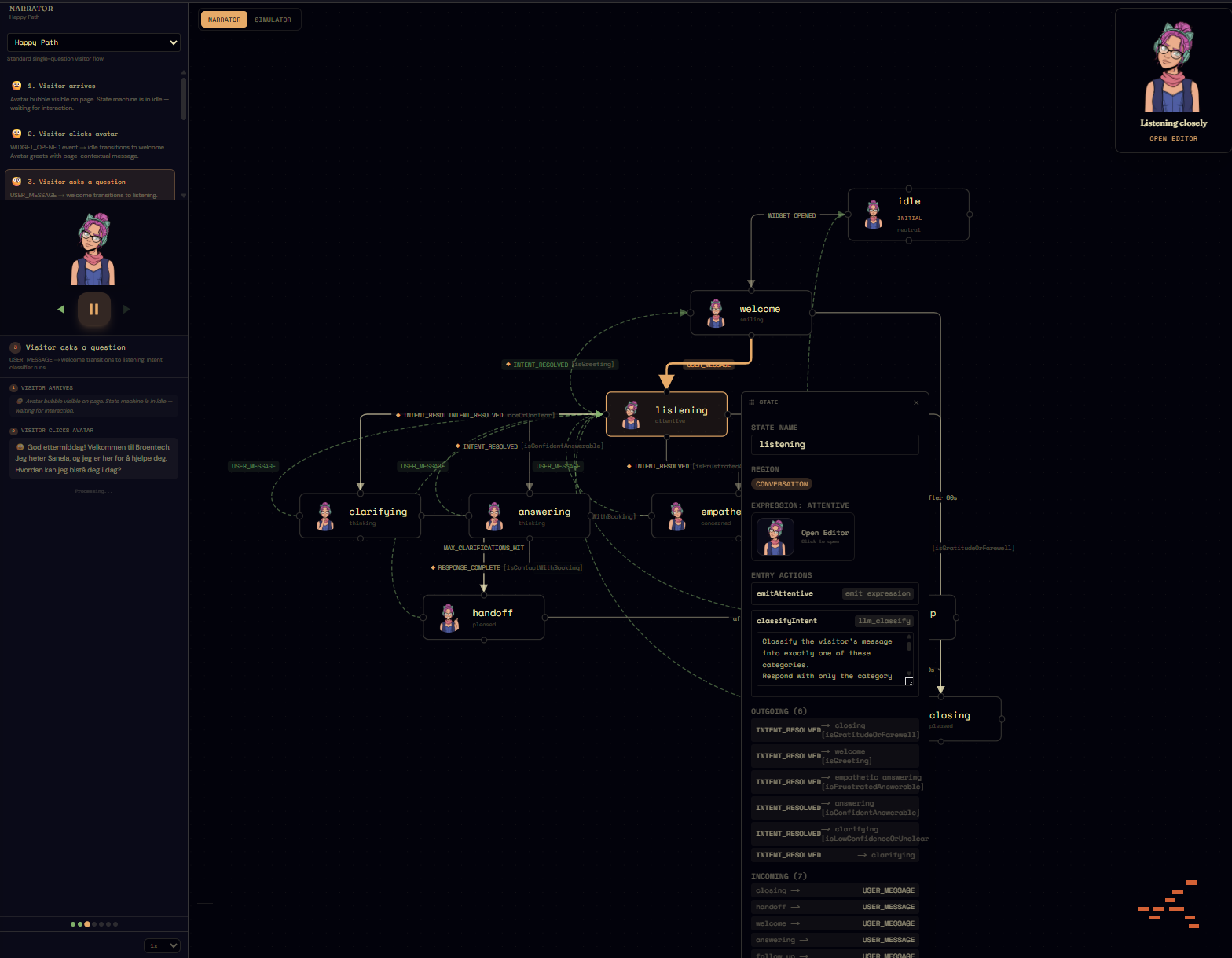
Three things move together as it plays:
- The canvas. The active state node lights up and the edge it just traversed is highlighted, so you literally watch idle → welcome → listening → answering → follow_up trace across the graph.
- The chat log. The visitor's messages and the avatar's actually generated replies stack up in the panel, each tagged with the expression the avatar resolved to.
- The face. The preview swaps to the resolved expression for each turn.
Because every message step is a genuine model call — intent classification, then response generation — a short cooldown bar runs between turns; that's the runtime pacing itself, not lag. The step-back/forward buttons and the progress dots let you revisit any moment without re-running it.
The built-in scenarios
Happy Path is the one that matters for deployment, but the dropdown carries a small suite chosen to exercise the parts of the state machine a single clean question never reaches:
- Happy Path — open, one question, one answer, idle out. The canonical flow.
- Multi-Turn Inquiry — several questions in a row, ending in a booking handoff and a gratitude close. Exercises the
follow_up → listeningloop and the contact-with-booking guard. - Confused Visitor — vague messages that route to
clarifying, hit the max-clarifications ceiling, fall through tohandoff, then recover with a clear question. - Frustrated User — sentiment turns negative mid-chat, the expression overrides to concerned, and the
isFrustratedAnswerableguard routes toempathetic_answeringso the avatar acknowledges the frustration before answering. - Low Confidence — the classifier has a guess but isn't sure, so the low-confidence guard sends it to
clarifyinganyway rather than answering on a hunch.
If the avatar's company context includes a site crawl, a sixth Guided Tour scenario is generated from the crawled pages (marked with a * in the dropdown) — a journey through your own content rather than a generic flow.
From recording to verify_deployment
When a run reaches its last step, the Narrator captures it — every step's state, expression, intent, sentiment, confidence, message, and reply, with timestamps. You can preview that capture as Markdown and download it (the MD button), and throw away a bad take with Discard before replaying.
That capture is what makes the Narrator more than a preview. A completed Happy Path run becomes the avatar's expected narrative — and it's not optional: deploying requires one. The Deploy button won't ship an avatar with no recorded happy path; instead it opens the Narrative Player with the scenario armed and a pulsing Play button, so the path from "blocked" to "deployed" is one completed run. From then on, a coding agent wiring the avatar into a host site can lean on two MCP tools against that ground truth: get_expected_narrative returns the recorded happy-path, and verify_deployment runs the same journey end-to-end against the integrator's own backend and hands back a diff — the single most useful "did I wire this up correctly?" check there is. The conversation you watched here is the contract the integration is held to, which is exactly why an avatar can't deploy without it.
What comes next
The Narrator plays scripts. Its companion, the Simulator, is the other half: free-form chat against the very same live state machine, where you type whatever you like and watch a millisecond-granular trace of every transition, guard, classification, and expression change. Scripts prove the journeys you expect; the Simulator is where you go looking for the ones you didn't.