
Test
The Simulator
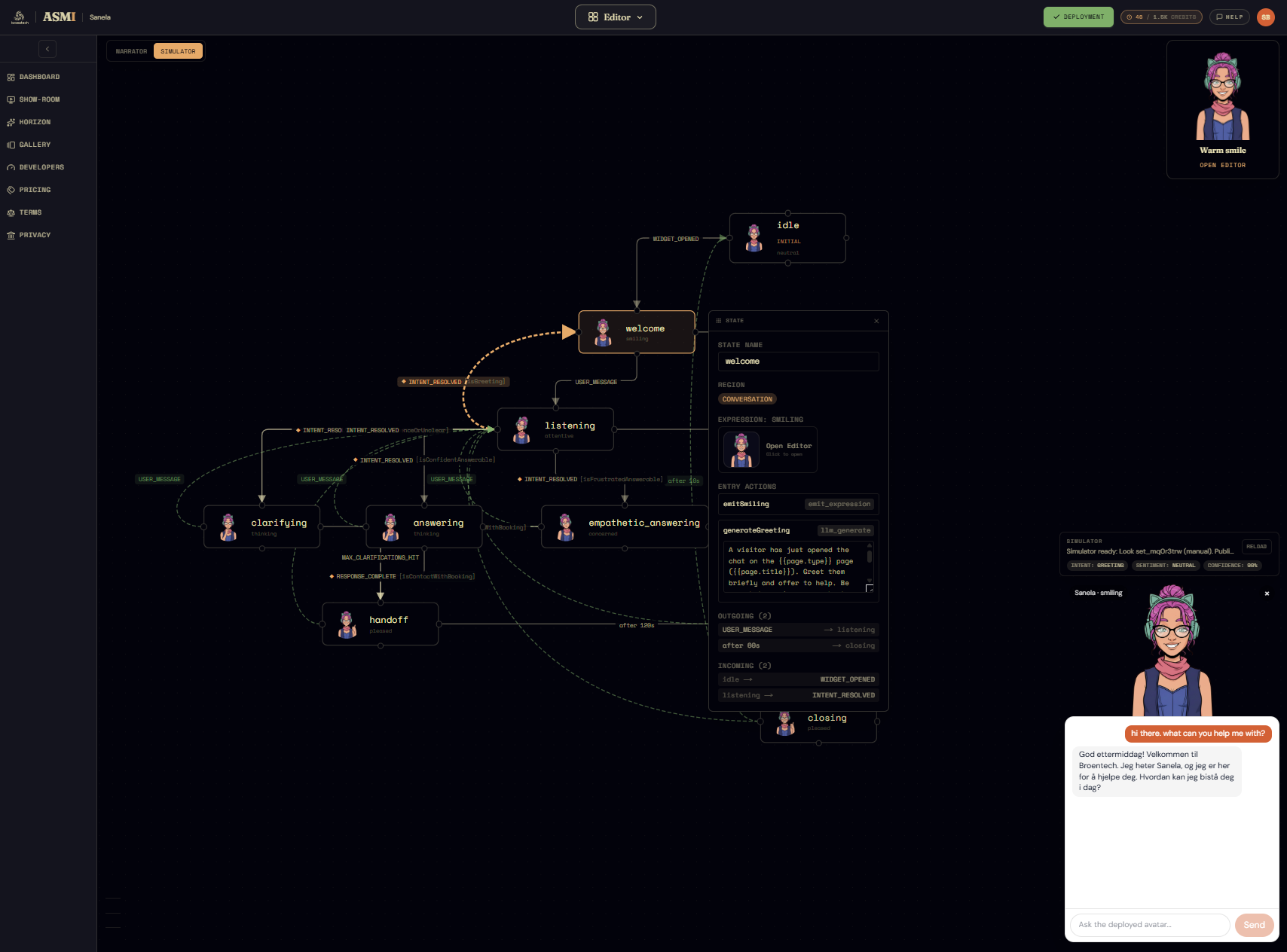
The Narrator plays scripts. The Simulator is the other way to test — free-form. It's the same production chat widget your visitors will eventually use, dropped into the studio and pointed at the avatar exactly as deployed, so you can type whatever you want and see precisely what a real visitor would get back, in both words and expression.
Getting in
The Simulator is the second of the two test toggles in the studio's top-left corner, paired with the Narrator and mutually exclusive with it. Where the Narrator runs your in-editor draft through a fixed script, the Simulator loads the avatar as deployed — its public definition and its published knowledge base — and renders the real <AsmiAvatar> widget (the very component a host site embeds) docked in the corner of the canvas.
Talking to it
Type a message and send, the way you would in any chatbot. The avatar answers through its real runtime — intent classification, sentiment, guards, transitions, response generation — so the reply, the chosen expression, and the path it took are all genuine, not staged. Each turn is a real, billed model call — the same generation path as the rest of the editor.
Two readouts make the machinery visible while you chat:
- The canvas. The active state lights up and the traversed edge is highlighted as the runtime moves — welcome → listening → answering → follow_up — exactly the highlighting the Narrator uses, but driven by your live messages instead of a script.
- The classification pills. The widget header shows the runtime's live read on your last message — intent, sentiment, and a confidence percentage — so you can see why it routed the way it did, and catch a question that classified wrong.
Why it's the closest thing to production
The fidelity is the point. The Simulator isn't a stylised preview — it's the same widget, the same runtime, the deployed definition, and the published knowledge, all running together. If it answers a question here, a visitor on your site gets the same answer; if it picks concerned over smiling here, that's what ships. It's the last check before the avatar leaves the studio.
Pair it with the database
Because the Simulator reads published knowledge, it's the natural partner to the database editor. Ask it a question that targets a specific knowledge item, then flip that item between published and draft (or use Move to proposals) and ask again. You'll watch the answer appear and disappear — the quickest way to confirm that a published item actually grounds the response, and that an unpublished one correctly stays out of reach.
What comes next
Between the two surfaces you've now covered both halves of testing: the Narrator proves the journeys you scripted, and the Simulator lets you hunt for the ones you didn't — against the exact artifact you'll deploy. With the avatar built and tested, the remaining chapters move on to shipping it: handing the blueprint to a coding agent (Lovable, base44, v0…), which wires it into a host site and verifies the integration against the happy-path you recorded in the Narrator.